Cloud vertices, What is it ?
Note —
cloud_verticesautomatically falls back to its model-only version when wxPython is unavailable. You can also import the model explicitly:from wolfhece.PyVertex._model import cloud_vertices. See the Model/GUI architecture tutorial for details.
Basics
Cloud vertices is a synonym for point cloud. It is a group of points in a 3D space.
It can be initialized from:
a list of vertices
a numpy array (shape (N, 3))
an Excel file
a CSV file (with/without header)
a Shape file (point type)
a DXF file (MTEXT or INSERT)
Each point can have associated values.
Storage
cloud_vertices supports two internal storage backends represented by StorageMode:
StorageMode.DICT(legacy): rows are stored asmyvertices[id] = {'vertex': wolfvertex, ...}StorageMode.NUMPY: coordinates are stored in compact NumPy arrays for large clouds
By default, init_from_nparray(array) uses an automatic switch:
if
len(array) < 100_000: keep dict backendif
len(array) >= 100_000: switch to numpy backend
You can switch explicitly with:
cloud.switch_storage_mode(StorageMode.NUMPY)cloud.switch_storage_mode(StorageMode.DICT)
Strings ('numpy', 'dict') are still accepted for backward compatibility.
The current mode is available via cloud.storage_mode (an enum value).
Important compatibility note: reading cloud.myvertices always gives a dict view; if the cloud is in NumPy mode, it is materialized back to dict.
Properties
The cloud has a cloudproperties attribute that contains some properties (mainly for visualization in OpenGL).
KD-tree
A KD-tree is a data structure that allows for efficient nearest neighbor searches in a multi-dimensional space. It is particularly useful for spatial queries, such as finding the closest points in a point cloud.
Each instance of cloud_vertices has a KD-tree associated with it. The KD-tree is built using the vertices of the point cloud, and it allows for fast nearest neighbor searches.
[ ]:
from wolfhece import __version__
assert __version__ > '2.2.9', f'Bad version of wolfhece: {__version__} <= 2.2.9'

from wolfhece.PyVertex import cloud_vertices, wolfvertex
from wolfhece.PyVertex._model import StorageMode

import numpy as np
Create a new cloud_vertices instance
[2]:
vertices = np.array([[0, 0, 0], [1, 1, 1], [2, 2, 2], [3, 3, 3], [4, 4, 4]])

cloud = cloud_vertices()

cloud.init_from_nparray(vertices)
Storage modes and automatic switch
The next example uses a very small threshold (10 points) only for demonstration. In production, the default threshold is 100_000 points.
[ ]:
# Demo only: lower the threshold to trigger the auto-switch quickly
cloud_auto = cloud_vertices()
cloud_auto.AUTO_NUMPY_SWITCH_THRESHOLD = 10

small = np.arange(27, dtype=np.float64).reshape(9, 3)
big = np.arange(30, dtype=np.float64).reshape(10, 3)

cloud_auto.init_from_nparray(small)
print('mode for 9 points:', cloud_auto.storage_mode)

cloud_auto.init_from_nparray(big)
print('mode for 10 points:', cloud_auto.storage_mode)

# Explicit switch with enum
cloud_auto.switch_storage_mode(StorageMode.DICT)
print('mode after explicit switch:', cloud_auto.storage_mode)

# Backward-compatible strings still work
cloud_auto.switch_storage_mode('numpy')
print('mode after string switch:', cloud_auto.storage_mode)
[3]:
# number of vertices
print(cloud.nbvertices)

# Header information
print(cloud.has_values)
print(cloud.header)
5
False
[]
Plot by matplotlib
[4]:
cloud.plot_matplotlib()
[4]:
(<Figure size 640x480 with 1 Axes>, <Axes: >)
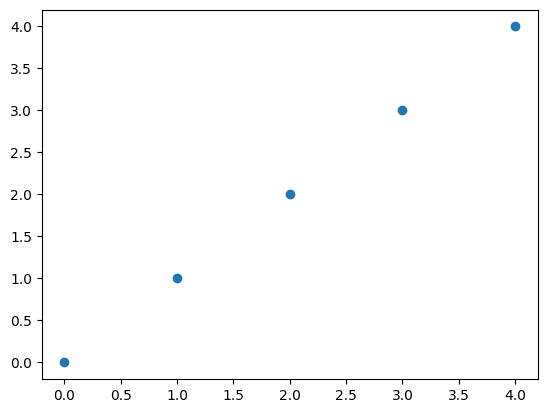
Get coordinates of the vertices
[4]:
xyz = cloud.xyz # -> np.ndarray with shape (n,3)

print(xyz)
[[0. 0. 0.]
 [1. 1. 1.]
 [2. 2. 2.]
 [3. 3. 3.]
 [4. 4. 4.]]
Add a value
[5]:
new_val = np.array([1, 2, 3, 4, 5])

cloud.add_values_by_id_list('test', new_val)

print(cloud.header)
['vertex', 'test']
Get coordinates but value as z
[6]:
xyz_val = cloud.get_xyz('test')

print(xyz_val)
[[0. 0. 1.]
 [1. 1. 2.]
 [2. 2. 3.]
 [3. 3. 4.]
 [4. 4. 5.]]
Find the nearest vertex
[7]:
nb = 1
dist, vert, assoc_dict = cloud.find_nearest([[.5, .5, 0.]], nb= nb)

# If the number of neighbors is 1, the output is a single list of vertices and distances
# If the number of neighbors is greater than 1, the output is a list of lists of vertices and distances

print('distance:', dist)
print('vertex:', vert.x, vert.y, vert.z)
print('key:', assoc_dict)
distance: 0.7071067811865476
vertex: 0.0 0.0 0.0
key: {'vertex': <wolfhece.PyVertex.wolfvertex object at 0x000002B1087DA4A0>, 'test': np.int64(1)}
Find the nearest vertices
nb = 2
[8]:
nb = 2
dist, vert, assoc_dict = cloud.find_nearest(np.asarray([[.5, .5, 0.]]), nb= nb)

# If the number of neighbors is 1, the output is a single list of vertices and distances
# If the number of neighbors is greater than 1, the output is a list of lists of vertices and distances

print('number of neighbors:', len(dist))

for i in range(nb):
    print('distance:', dist[i])
    print('vertex:', vert[i].x, vert[i].y, vert[i].z)
    print('key:', assoc_dict[i])
number of neighbors: 2
distance: 0.7071067811865476
vertex: 0.0 0.0 0.0
key: {'vertex': <wolfhece.PyVertex.wolfvertex object at 0x000002B1087DA4A0>, 'test': np.int64(1)}
distance: 1.224744871391589
vertex: 1.0 1.0 1.0
key: {'vertex': <wolfhece.PyVertex.wolfvertex object at 0x000002B128E67DF0>, 'test': np.int64(2)}
Find the nearest vertex for multiple points
[9]:
nb = 2
xyz1 = [.5, 1., 0.]
xyz2 = [.5, 2., 1.]
dist, vert, assoc_dict = cloud.find_nearest([xyz1, xyz2], nb= nb)

# If the number of neighbors is 1, the output is a single list of vertices and distances
# If the number of neighbors is greater than 1, the output is a list of lists of vertices and distances

if nb ==1:
    for i_vert in range(2):
        print('distance:', dist[i_vert])
        print('vertex:', vert[i_vert].x, vert[i_vert].y, vert[i_vert].z)
        print('key:', assoc_dict[i_vert])
else:
    for i_vert in range(2):
        for i in range(nb):
            dist_list = dist[i_vert]
            vert_list = vert[i_vert]
            assoc_dict_list = assoc_dict[i_vert]

            print('distance:', dist_list[i])
            print('vertex:', vert_list[i].x, vert_list[i].y, vert_list[i].z)
            print('key:', assoc_dict_list[i])
distance: 1.118033988749895
vertex: 1.0 1.0 1.0
key: {'vertex': <wolfhece.PyVertex.wolfvertex object at 0x000002B128E67DF0>, 'test': np.int64(2)}
distance: 1.118033988749895
vertex: 0.0 0.0 0.0
key: {'vertex': <wolfhece.PyVertex.wolfvertex object at 0x000002B1087DA4A0>, 'test': np.int64(1)}
distance: 1.118033988749895
vertex: 1.0 1.0 1.0
key: {'vertex': <wolfhece.PyVertex.wolfvertex object at 0x000002B128E67DF0>, 'test': np.int64(2)}
distance: 1.8027756377319946
vertex: 2.0 2.0 2.0
key: {'vertex': <wolfhece.PyVertex.wolfvertex object at 0x000002B128E66350>, 'test': np.int64(3)}
Performance guidelines (quick recap)
Use StorageMode.DICT when:
the cloud is small (typically below 100_000 points),
you often mutate individual rows or access
myverticesdirectly.
Use StorageMode.NUMPY when:
the cloud is large (100_000+ points),
you mostly run bulk operations (
get_xyz,find_minmax, nearest-neighbor queries).
Practical tips:
Keep
numpy_backend=Noneto use the automatic threshold-based switch.Prefer
switch_storage_mode(StorageMode.NUMPY)orswitch_storage_mode(StorageMode.DICT)for explicit control.Strings (
'numpy','dict') remain supported for backward compatibility.Reading
myverticesalways returns a dict view and may materialize data from NumPy mode for compatibility.