wolfhece.Lidar2002
Author: HECE - University of Liege, Pierre Archambeau Date: 2024
Copyright (c) 2024 University of Liege. All rights reserved.
This script and its content are protected by copyright law. Unauthorized copying or distribution of this file, via any medium, is strictly prohibited.
Module Contents
- class wolfhece.Lidar2002.Lidar2002(fname: str = None, mold: wolfhece.wolf_array._base.WolfArrayModel = None, masknull: bool = True, crop: list[list[float], list[float]] = None, whichtype=WOLF_ARRAY_FULL_SINGLE, preload: bool = True, create: bool = False, mapviewer=None, nullvalue: float = 0.0, srcheader: wolfhece.wolf_array._header_wolf.header_wolf = None, idx: str = '', plotted: bool = False, need_for_wx: bool = False, mask_source: numpy.ndarray = None, np_source: numpy.ndarray = None)[source]
Bases:
wolfhece.wolf_array.WolfArray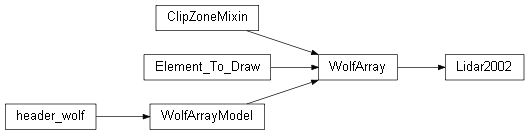
GUI-enabled WolfArray with OpenGL rendering and wxPython integration.
Inherits all data operations from
WolfArrayModeland adds:OpenGL 2D rendering via display-lists (Cython
wolfogl) or GLSL shaders (WolfArrayShader2D).LOD tiling: the grid is divided into tiles whose resolution adapts to the current zoom level.
Palette / colormap management with automatic
isopopadjustment.Interactive wx dialogs for crop, band selection, volume estimation, file saving, and error reporting.
Ops_Arrayintegration for the GUI operations panel.3D preview via
WolfArrayPlotShader.
- class wolfhece.Lidar2002.ASC_file(fname=None, mold=None, masknull=True)[source]
Bases:
Lidar2002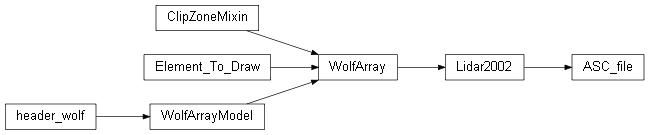
GUI-enabled WolfArray with OpenGL rendering and wxPython integration.
Inherits all data operations from
WolfArrayModeland adds:OpenGL 2D rendering via display-lists (Cython
wolfogl) or GLSL shaders (WolfArrayShader2D).LOD tiling: the grid is divided into tiles whose resolution adapts to the current zoom level.
Palette / colormap management with automatic
isopopadjustment.Interactive wx dialogs for crop, band selection, volume estimation, file saving, and error reporting.
Ops_Arrayintegration for the GUI operations panel.3D preview via
WolfArrayPlotShader.
- class wolfhece.Lidar2002.BSQ_file(fname=None, mold=None, masknull=True)[source]
Bases:
Lidar2002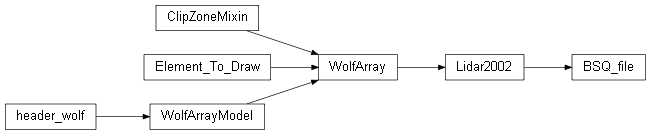
GUI-enabled WolfArray with OpenGL rendering and wxPython integration.
Inherits all data operations from
WolfArrayModeland adds:OpenGL 2D rendering via display-lists (Cython
wolfogl) or GLSL shaders (WolfArrayShader2D).LOD tiling: the grid is divided into tiles whose resolution adapts to the current zoom level.
Palette / colormap management with automatic
isopopadjustment.Interactive wx dialogs for crop, band selection, volume estimation, file saving, and error reporting.
Ops_Arrayintegration for the GUI operations panel.3D preview via
WolfArrayPlotShader.