Analyse de débits avec “flow_SPWMI”
Avec les données disponibles sur https://hydrometrie.wallonie.be
Import de modules
[1]:
from wolfhece.hydrometry.flow_SPW import *
from datetime import datetime as dt
from datetime import timezone as tz
from datetime import timedelta as td
Allocation d’une instance de classe
On peut pointer sur les données à pas horaire ou à haute résolution temporelle.
Les données sont des hauteurs d’eau ou des débits.
[2]:
q_1h = SPW_flows_1h()
q_highres = SPW_flows_highres()

h_1h = SPW_waterdepth_1h()
Téléchargement local des données
Il est possible de télécharger les données localement et de les sauver au format pandas.Parquet pour une utilisation ultérieure.
Attention:
Les données à haute résolution temporelle sont plus volumineuses et peuvent nécessiter plus de temps pour le téléchargement et le traitement.
Le serveur du SPW peut limiter le nombre de requêtes, il est donc recommandé de télécharger les données localement si vous prévoyez de les utiliser fréquemment.
Le téléchargement de toute la base de données est une opération lourde. Il pourrait être préférable d’adresser une requête spécisfique pour une station et une période donnée.
[3]:
# h_1h.download_all()
q_highres.download_one(name='CHAUDFONTAINE Pisc')
q_1h.download_one(name='CHAUDFONTAINE Pisc')
INFO:root:The file C:\Users\pierre\Documents\Gitlab\HECEPython\wolfhece\hydrometry\..\data\hydrometry\q\highres\298643010.parquet already exists, skipping to the next one
INFO:root:The file C:\Users\pierre\Documents\Gitlab\HECEPython\wolfhece\hydrometry\..\data\hydrometry\q\1h\298620010.parquet already exists, skipping to the next one
Récupération de données
Pour l’exemple à Chaudfontaine, pour l’année 2000
Depuis le web
[4]:
fromweb = q_highres.get_data(name='CHAUDFONTAINE Pisc', fromyear=2000, toyear=2000)
Depuis un fichier local
[6]:
fromparquet = q_highres.load(name='CHAUDFONTAINE Pisc', fromdate=dt(2000,1,1,1), todate=dt(2001,10,1,1))
Pour plusieurs années
Les nombre de données par requêtes est limité à 250_000 valeurs. Il est donc nécessaire de faire plusieurs requêtes pour récupérer une longue période.
Ce nombre de valeurs est paramétrable est est fixé par défaut à 100_000.
[15]:
data_amay = q_highres.get_data(name='amay', fromyear=2000, toyear=2026)
INFO:root:Getting data from 2000-01-01 00:00:00+01:00 to 2000-12-13 05:20:00+01:00
INFO:root:Getting data from 2000-12-13 05:25:00+01:00 to 2001-11-25 10:45:00+01:00
INFO:root:Getting data from 2001-11-25 10:50:00+01:00 to 2002-11-07 16:10:00+01:00
INFO:root:Getting data from 2002-11-07 16:15:00+01:00 to 2003-10-20 21:35:00+02:00
INFO:root:Getting data from 2003-10-20 21:40:00+02:00 to 2004-10-02 03:00:00+02:00
INFO:root:Getting data from 2004-10-02 03:05:00+02:00 to 2005-09-14 08:25:00+02:00
INFO:root:Getting data from 2005-09-14 08:30:00+02:00 to 2006-08-27 13:50:00+02:00
INFO:root:Getting data from 2006-08-27 13:55:00+02:00 to 2007-08-09 19:15:00+02:00
INFO:root:Getting data from 2007-08-09 19:20:00+02:00 to 2008-07-22 00:40:00+02:00
INFO:root:Getting data from 2008-07-22 00:45:00+02:00 to 2009-07-04 06:05:00+02:00
INFO:root:Getting data from 2009-07-04 06:10:00+02:00 to 2010-06-16 11:30:00+02:00
INFO:root:Getting data from 2010-06-16 11:35:00+02:00 to 2011-05-29 16:55:00+02:00
INFO:root:Getting data from 2011-05-29 17:00:00+02:00 to 2012-05-10 22:20:00+02:00
INFO:root:Getting data from 2012-05-10 22:25:00+02:00 to 2013-04-23 03:45:00+02:00
INFO:root:Getting data from 2013-04-23 03:50:00+02:00 to 2014-04-05 09:10:00+02:00
INFO:root:Getting data from 2014-04-05 09:15:00+02:00 to 2015-03-18 14:35:00+01:00
INFO:root:Getting data from 2015-03-18 14:40:00+01:00 to 2016-02-28 20:00:00+01:00
INFO:root:Getting data from 2016-02-28 20:05:00+01:00 to 2017-02-10 01:25:00+01:00
INFO:root:Getting data from 2017-02-10 01:30:00+01:00 to 2018-01-23 06:50:00+01:00
INFO:root:Getting data from 2018-01-23 06:55:00+01:00 to 2019-01-05 12:15:00+01:00
INFO:root:Getting data from 2019-01-05 12:20:00+01:00 to 2019-12-18 17:40:00+01:00
INFO:root:Getting data from 2019-12-18 17:45:00+01:00 to 2020-11-29 23:05:00+01:00
INFO:root:Getting data from 2020-11-29 23:10:00+01:00 to 2021-11-12 04:30:00+01:00
INFO:root:Getting data from 2021-11-12 04:35:00+01:00 to 2022-10-25 09:55:00+02:00
INFO:root:Getting data from 2022-10-25 10:00:00+02:00 to 2023-10-07 15:20:00+02:00
INFO:root:Getting data from 2023-10-07 15:25:00+02:00 to 2024-09-18 20:45:00+02:00
INFO:root:Getting data from 2024-09-18 20:50:00+02:00 to 2025-09-01 02:10:00+02:00
INFO:root:Getting data from 2025-09-01 02:15:00+02:00 to 2026-08-14 07:35:00+02:00
INFO:root:Getting data from 2026-08-14 07:40:00+02:00 to 2026-12-31 23:59:59+01:00
Mise à jour
Si vous avez chargé une fois toutes les données, il est possible de mettre à jour avec uniquement les données manquantes.
[12]:
# q_1h.update_all()
Chargement en mémoire de toutes les données disponibles localement
[16]:
all_data_1h = q_1h.load_all()
# all_data_highres = q_highres.load_all()
239it [00:03, 64.93it/s] WARNING:root:The file C:\Users\pierre\Documents\Gitlab\HECEPython\wolfhece\hydrometry\..\data\hydrometry\q\1h\348976010.parquet is empty, unable to load data for station C:\Users\pierre\Documents\Gitlab\HECEPython\wolfhece\hydrometry\..\data\hydrometry\q\1h\348976010.parquet
249it [00:03, 72.80it/s]WARNING:root:The file C:\Users\pierre\Documents\Gitlab\HECEPython\wolfhece\hydrometry\..\data\hydrometry\q\1h\350094010.parquet is empty, unable to load data for station C:\Users\pierre\Documents\Gitlab\HECEPython\wolfhece\hydrometry\..\data\hydrometry\q\1h\350094010.parquet
WARNING:root:The file C:\Users\pierre\Documents\Gitlab\HECEPython\wolfhece\hydrometry\..\data\hydrometry\q\1h\359643010.parquet is empty, unable to load data for station C:\Users\pierre\Documents\Gitlab\HECEPython\wolfhece\hydrometry\..\data\hydrometry\q\1h\359643010.parquet
WARNING:root:The file C:\Users\pierre\Documents\Gitlab\HECEPython\wolfhece\hydrometry\..\data\hydrometry\q\1h\360267010.parquet is empty, unable to load data for station C:\Users\pierre\Documents\Gitlab\HECEPython\wolfhece\hydrometry\..\data\hydrometry\q\1h\360267010.parquet
269it [00:03, 77.29it/s]
Calcul de statistiques
[16]:
stats_1h = q_1h.analyze_all()
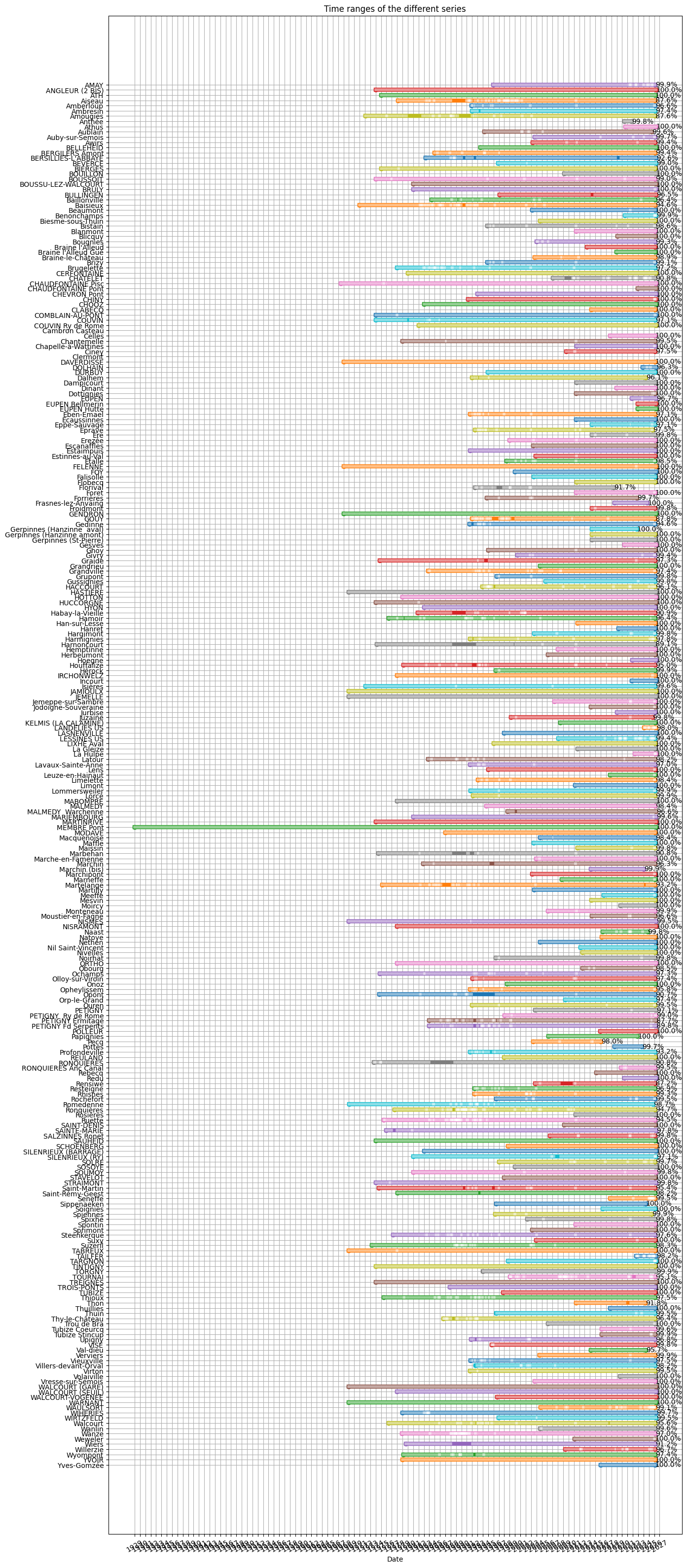
Visualisation des périodes couvertes
[20]:
fig, ax = q_1h.plot_time_ranges(stats_1h)
fig.set_size_inches(15, 40)
WARNING:root:Unable to plot time range for series Clermont: Failed to convert value(s) to axis units: array([NaT, NaT], dtype=object)
WARNING:root:Unable to plot time range for series Cambron Casteau: Failed to convert value(s) to axis units: array([NaT, NaT], dtype=object)
Noms des stations
[20]:
names_1h = sorted(q_1h.get_names())
print('\n'.join(names_1h))
AMAY
ANGLEUR (2 BIS)
ATH
Aiseau
Amberloup
Ambresin
Amougies
Anthée
Archennes
Athus
Aublain
Auby-sur-Semois
Awirs
BELLEHEID
BERGILERS Amont
BERSILLIES-L'ABBAYE
BEVERCE
BIERGES
BOUILLON
BOUSSOIT
BOUSSU-LEZ-WALCOURT
BRULY
BULLINGEN
Baillonville
Baisieux
Baisieux
Beaumont
Benonchamps
Biesme-sous-Thuin
Bistain
Blanmont
Blicquy
Bougnies
Braine l'Alleud
Braine l'Alleud Gué
Braine-le-Château
Brizy
Brugelette
CERFONTAINE
CHATELET
CHAUDFONTAINE Pisc
CHAUDFONTAINE Pont
CHEVRON Pont
CHINY
CHOOZ
CLABECQ
COMBLAIN-AU-PONT
COUVIN
COUVIN Ry de Rome
Cambron Casteau
Celles
Chantemelle
Chapelle-à-Wattines
Ciney
Clermont
Couvin
DAVERDISSE
DOLHAIN
DURBUY
Dalhem
Dalhem
Dampicourt
Daverdisse
Dinant
Donstiennes
Dottignies
EUPEN
EUPEN Bellmerin
EUPEN Hütte
Eben-Emael
Ecaussinnes
Eppe-Sauvage
Eprave
Ere
Erezée
Escanaffles
Estaimpuis
Estinnes-au-Val
Etalle
FELENNE
FOY
Falisolle
Flobecq
Florival
Foret
Forrières
Frasnes-lez-Anvaing
Froidmont
GENDRON
GOUY
Gedinne
Gerpinnes (Hanzinne  aval)
Gerpinnes (Hanzinne amont)
Gerpinnes (St-Pierre)
Gesves
Ghoy
Givry
Graide
Grandrieu
Grandville
Grupont
Gussignies
HACCOURT
HASTIERE
HOTTON
HUCCORGNE
HYON
Habay-la-Vieille
Hamoir
Han-sur-Lesse
Hanret
Hargimont
Hargimont
Harmignies
Harnoncourt
Hemptinne
Herbeumont
Hoegne
Houffalize
Hérock
IRCHONWELZ
Incourt
Isières
JAMIOULX
JEMELLE
Jemeppe-sur-Sambre
Jodoigne-Souveraine
Jurbise
Juzaine
KELMIS (LA CALAMINE)
LANDELIES US
LASNENVILLE
LESSINES US
LIXHE Aval
La Gleize
La Hulpe
Latour
Lavaux-Sainte-Anne
Lens
Leuze-en-Hainaut
Limelette
Limont
Lommersweiler
Lorcé
MABOMPRE
MALMEDY
MALMEDY  Warchenne
MARIEMBOURG
MARTINRIVE
MEMBRE Pont
MODAVE
Macquenoise
Maffle
Maissin
Malmedy
Marbehan
Marche-en-Famenne
Marchin
Marchin (bis)
Marchipont
Marneffe
Martelange
Martilly
Martilly
Meeffe
Mesvin
Modave
Moircy
Monteneau
Moustier-en-Fagne
NISMES
NISRAMONT
Naast
Natoye
Nethen
Nil Saint-Vincent
Nivelles
Noirhat
ORTHO
Obourg
Ochamps
Olloy-sur-Viroin
Onoz
Opheylissem
Opont
Orp-le-Grand
Ouren
PETIGNY
PETIGNY  Ry de Rome
PETIGNY Ermitage
PETIGNY Fd Serpents
POLLEUR
Papignies
Pecq
Pottes
Profondeville
REULAND
RONQUIERES
RONQUIERES Anc Canal
Rebecq
Redu
Rensiwé
Resteigne
Reuland
Rhisnes
Riconvert
Rochefort
Romedenne
Ronquières
Rosières
Ruette
SAINT-DENIS
SAINTE-MARIE
SALZINNES Ronet
SAUHEID
SCHOENBERG
SILENRIEUX (BARRAGE)
SILENRIEUX (RY)
SOLRE
SOSOYE
SOUMOY
STAVELOT
STRAIMONT
Saint-Martin
Saint-Rémy-Geest
Seneffe
Sippenaeken
Soignies
Spiennes
Spixhe
Spontin
Sprimont
Stavelot
Stavelot
Steenkerque
Steenkerque
Suxy
Suzeril
TABREUX
TAILFER
TARGNON
TINTIGNY
TORGNY
TOURNAI
TREIGNES
TROIS-PONTS
TUBIZE
Thioux
Thon
Thuillies
Thuin
Thy-le-Bauduin
Thy-le-Château
Tintigny
Tournai
Trois-Ponts
Trou de Bra
Tubize
Tubize Coeurcq
Tubize Stincup
Upigny
VISE
Val-dieu
Verviers
Vieuxville
Villers-devant-Orval
Virton
Volaiville
Vresse-sur-Semois
WALCOURT (GARE)
WALCOURT (SEUIL)
WALCOURT-VOGENEE
WARNANT
WAULSORT
WAULSORT
WIHERIES
WIRTZFELD
Walcourt
Wanlin
Wanze
Weweler
Wiers
Willerzie
Wyompont
YVOIR
Yves-Gomzée
Yvoir
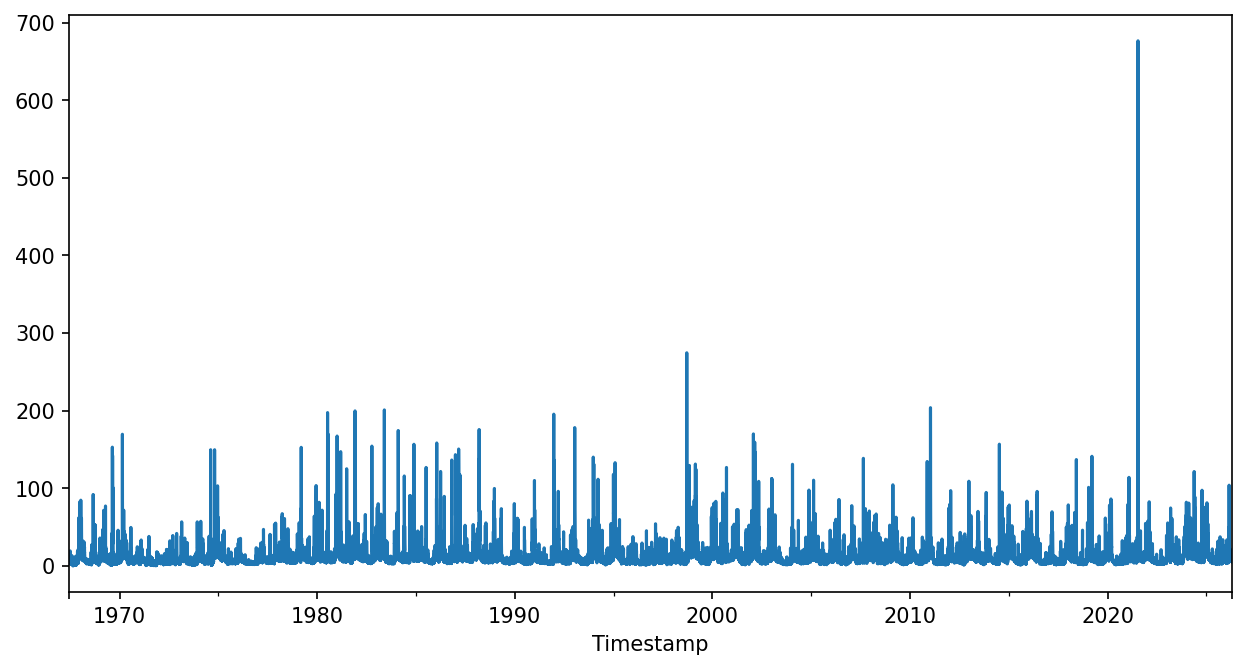
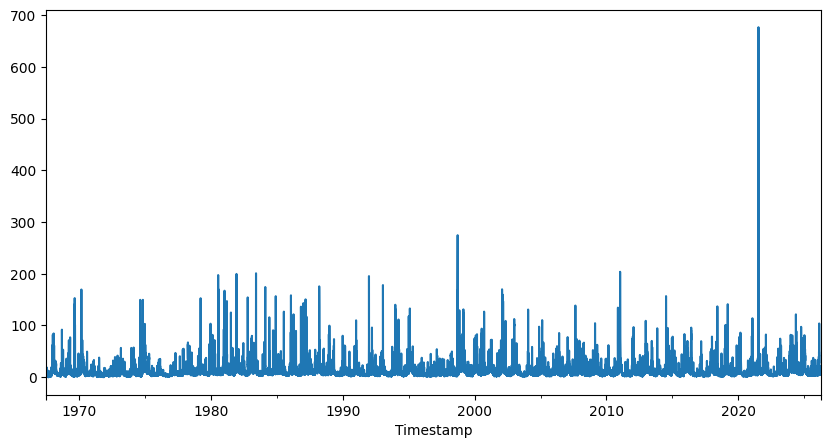
Graphique des mesures
Pour l’exemple à Chaudfontaine
Entre 2002 et 2022 selon une année hydrologique débutant en octobre
de débit
de hauteur
[ ]:
chaudfontaine_1h = q_1h['CHAUDFONTAINE Pisc']
[22]:
# %matplotlib widget
%matplotlib inline
fig,ax = plt.subplots(figsize=(10,5))
chaudfontaine_1h.plot(ax=ax, label='1h')
[22]:
<Axes: xlabel='Timestamp'>